AI CTI Agent: Delivers Report & STIX 2.1 Bundles
2026-05-04 · Neetrox
Most CTI workflows are a mess.
You get an alert. You copy an IP. You paste it into VirusTotal. You open another tab for AbuseIPDB. You manually check OTX. You try to remember the MITRE technique from that pulse you saw last month. By the time you’ve assembled something useful, thirty minutes are gone and you still don’t have a STIX bundle or a Navigator layer.
The CTI AI Agent solves this in one submission.
Submit any indicator — IP, domain, URL, file hash, CVE — and within 5–10 seconds you get a structured intelligence report delivered to Discord, Slack, and email simultaneously, with a STIX 2.1 bundle and a MITRE ATT&CK Navigator layer attached. The AI analysis runs locally via Ollama. No data leaves your network.
Here’s exactly how it works.
What’s Actually Happening Under the Hood
The workflow has 21 nodes in n8n. The pipeline runs in seven stages:
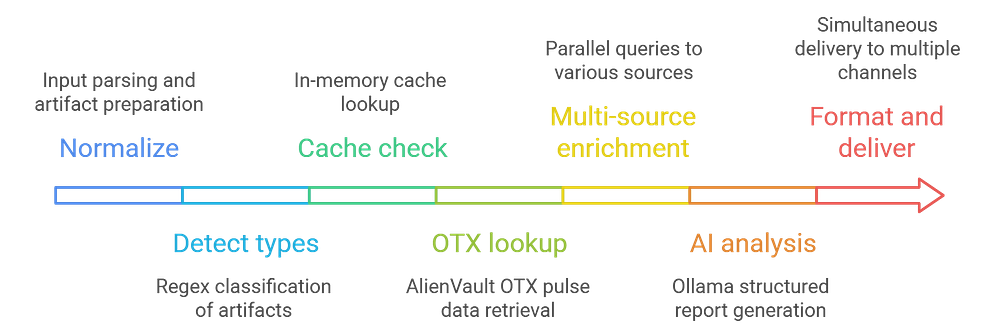
1. Normalize: Input from the webhook or web form is parsed. Artifacts are trimmed, deduplicated, and split into individual items. This matters for bulk submissions, one call with 50 IOCs produces one consolidated report.
2. Detect types: Regex classifies each artifact: IPv4, IPv6, domain, URL, MD5, SHA1, SHA256, or CVE. This determines which API endpoints get called per artifact — you never need to specify the type manually.
3. Cache check: Before making a single external API call, the workflow checks in-memory cache. If the same artifact was queried within the last hour, the cached result returns instantly — zero API quota burned, sub-second response. The API response includes _cached: true and _cacheAgeSec so you always know what you're working with.
4. OTX lookup: Each artifact hits AlienVault OTX for pulse data, malware family associations, and ATT&CK technique IDs. This is where the MITRE mapping starts.
5. Multi-source enrichment: VirusTotal, AbuseIPDB, GreyNoise, URLhaus, and Shodan are queried in parallel. Each source returns independently — a timeout or failure on one doesn’t block the others.
6. AI analysis: Ollama receives the compressed enrichment data and produces a structured JSON report: verdict, confidence level, per-artifact rationale, MITRE technique mappings, detection rule ideas, and actionable recommendations. The model runs on your hardware. Nothing gets sent to an external LLM API.
7. Format and deliver: Reports render for Discord, Slack, SMTP email, and Gmail simultaneously. All output nodes use onError: continueRegularOutput — one failing channel won't kill the rest.
The Report Is Structured Across Three Layers SOC Teams Actually Use
This isn’t a wall of raw API JSON. The AI organizes the output into three distinct layers:
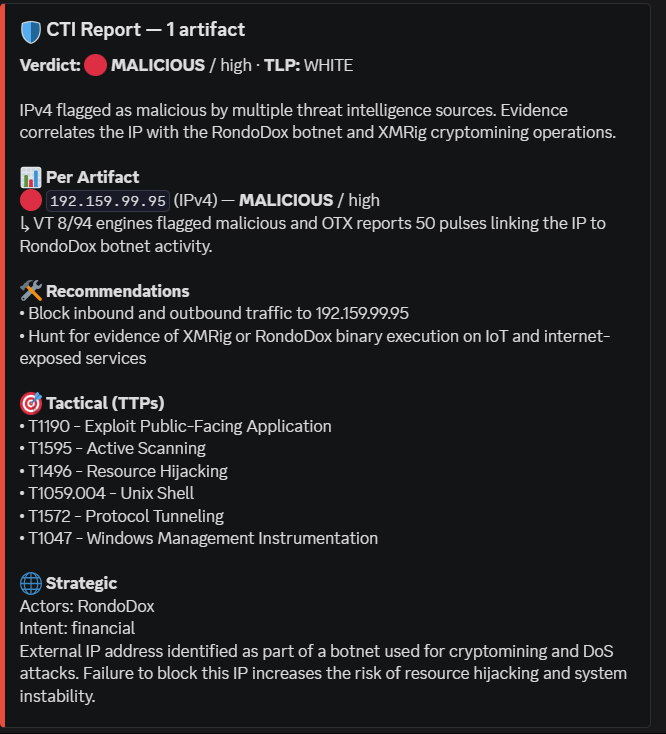
Technical (IoCs). Related IPs, domains, hashes, and URLs extracted from OTX pulses and VirusTotal relations. Concrete blocking recommendations that start with an action verb: Block, Hunt, Quarantine, Patch, Isolate. These map directly to SIEM rules and firewall policy.
Tactical (TTPs). MITRE ATT&CK technique IDs mapped from enrichment data. Sigma, YARA, and KQL detection rule ideas for your threat hunting and detection engineering pipeline.
Strategic. Threat actor attribution from OTX pulses. Victimology — industries, regions, targeted roles. Intent classification: espionage, financial, disruption, or hacktivism. An executive brief in plain language for leadership and board briefings.
Each artifact also gets its own per-artifact verdict with a one-sentence rationale citing specific numbers from the source data “VT 12/89 malicious, AbuseIPDB 87/100, OTX 3 pulses” so the analyst can see exactly why the decision was made.
Here’s the thing: the AI is explicitly constrained from hallucinating. If evidence is missing or inconclusive, the verdict is UNKNOWN and the rationale says "no data." No speculation.
The Verdict and Confidence System
Five verdict levels:
- 🔴 MALICIOUS — one or more high-confidence sources flagged it
- 🟠 SUSPICIOUS — anomalies detected but not confirmed malicious
- 🟡 MIXED — batch contains both malicious and benign artifacts
- 🟢 BENIGN — clean across multiple sources
- ⚪ UNKNOWN — insufficient data
Three confidence levels:
- HIGH — 3+ sources agree
- MEDIUM — 2 sources agree, or 1 strong signal + supporting context
- LOW — 1 source only, or contradictions between sources
The Discord embed color matches the verdict severity. At a glance, your SOC channel tells you what’s on fire.
Get the Workflow
The CTI AI Agent + Guide is available now on my store as a ready-to-import n8n JSON with full setup documentation.
👉 Get it from — Here
👉 Pay with Paypal — Here
The STIX 2.1 Bundle Is Automatic
Every report generates a STIX 2.1 bundle without any extra steps.
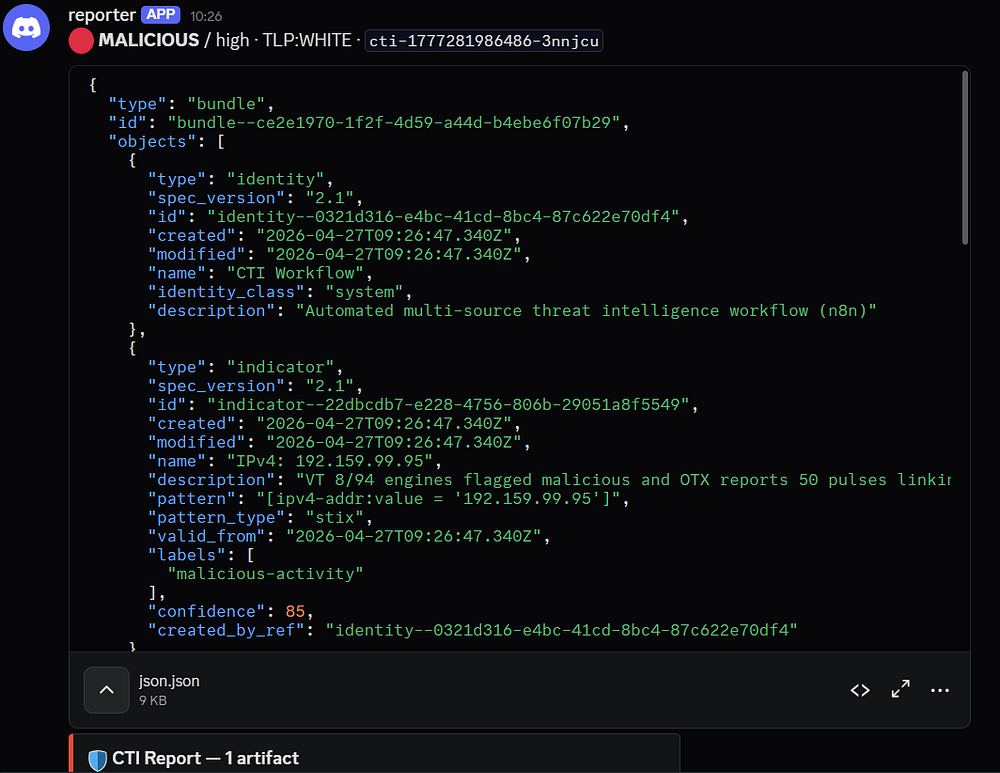
Bundle contents:
indicatorobjects with STIX patterns per artifact typevulnerabilityfor CVE artifactsthreat-actorfrom OTX pulse dataattack-patternwith MITRE ATT&CK referencesrelationshipobjects linking everything togethernotewith the executive summary
The bundle is attached to the email as .stix.json and returned in the webhook API response body. Drop it directly into MISP, OpenCTI, Anomali ThreatStream, Microsoft Sentinel, Splunk ES, or TheHive/Cortex.
This is the part that saves the most time in practice. Manual STIX authoring for a multi-artifact report takes hours. Here it’s a byproduct of the enrichment run.
The MITRE ATT&CK Navigator Layer
Every report also ships with a Navigator layer file.
To use it: open mitre-attack.github.io/attack-navigator, click Open Existing Layer → Upload from Local, and upload the .mitre-layer.json from the email attachment.
Every technique cited in the report appears highlighted on the live ATT&CK matrix, color-coded by verdict severity. Screenshot it for a leadership briefing. Feed it directly into your detection-engineering pipeline. Use it for purple team exercise scoping or compliance evidence.
This is not a feature you normally get from a free-tier threat intel workflow.
What You Need to Run It
Requirements are deliberately minimal:
- n8n — self-hosted or cloud
- Ollama — the AI analysis never leaves your network ( Or with API )
- AlienVault OTX — free; no quota limits worth worrying about
- VirusTotal — free tier, 500 lookups/day
- AbuseIPDB — free tier, 1,000 checks/day
- Shodan — free tier (low quota)
- GreyNoise community — no API key required
- URLhaus — no API key required
All API keys go in one place: the KEYS object at the top of the Multi-Source Enrich code node. You touch one file.
Setup in Six Steps
- Import
CTI_AI_agent.jsoninto n8n via Settings → Import Workflow - Open the Multi-Source Enrich code node, paste your API keys into the
KEYSobject - Configure the Ollama Chat Model node with your host and model name
- Create a Discord webhook and add it as an n8n credential, assign it to the Discord node
- Click Manual Trigger or open the Form Trigger URL
- Submit
8.8.8.8as a test — your first report arrives within 60 seconds
Two Ways to Submit IOCs
1- Web form (no code). Open the Form Trigger URL in any browser. Paste IOCs one per line, set TLP level, enter your email, add an optional analyst note. The note matters, giving the AI context like “from phishing email” or “spotted in firewall log” improves verdict quality.
2- Webhook API (automation). POST JSON to the webhook URL:
Single artifact:
curl -X POST https://<your-n8n-host>/webhook/<id> \
  -H 'Content-Type: application/json' \
  -d '{"artifact":"8.8.8.8","requester":"you@org.com","tlp":"amber"}'
Batch (up to 100):
curl -X POST https://<your-n8n-host>/webhook/<id> \
  -H 'Content-Type: application/json' \
  -d '{
    "artifacts": ["8.8.8.8","evil.com","CVE-2024-1234"],
    "requester": "you@org.com",
    "tlp": "amber",
    "note": "from IR ticket #4821"
  }'
The API returns the full JSON report, STIX bundle, and MITRE layer in the response body. Plug it into any upstream tool.
Every submission carries a TLP marking — WHITE, GREEN, AMBER (default), or RED — shown in all outputs so recipients know the sharing rules.
The Smart Cache Is Worth Calling Out Separately
If the same artifact gets queried within one hour, it returns from in-memory cache. No API calls, no Ollama inference, sub-second response.
For a SOC handling multiple analysts, this eliminates duplicate quota burn on VirusTotal and Shodan during an active incident when the same IPs get looked up repeatedly. The TTL is configurable in the workflow settings.
Who This Is For
If you’re running a SOC — whether internal or multi-client — and you’re still doing manual enrichment across five browser tabs, this workflow replaces that entire process.
It’s also the right tool if you need STIX-formatted intelligence for a TIP but don’t have an analyst with time to author bundles manually. And if you’re doing purple team exercises or detection engineering, the MITRE Navigator output gives you a ready-made visual scope for each engagement.
The workflow is available at neetrox.gumroad.com. Import it, configure four API keys, point it at your Ollama instance, and you’re operational.
Submit an IOC. Get a CTI report. Ship the STIX.