How to Automate a Wazuh Monthly Report (Technical + Management PDFs, Zero Manual Work)
2026-06-20 · Neetrox
Every first of the month, somewhere in the world, a security analyst opens Wazuh dashboards, screenshots a dozen charts, pastes them into a slide deck, and hand-types numbers into an executive summary that nobody on the leadership team will read past page one.
That ritual eats half a day. And it produces a report that’s stale the moment it’s sent.
There’s a better way. In this post, I’ll show you exactly how to turn your Wazuh monthly report into a fully automated pipeline, one that pulls live data from your Wazuh stack, builds two polished PDFs (one technical, one for management), and emails them on a schedule. No screenshots. No copy-paste. No hardcoded numbers. Just open the email on the 1st and both reports are already there.
I built this as an n8n workflow, and I’ll walk through the architecture so you can understand it, adapt it, or grab it and run.
Why Manual SIEM Reporting Quietly Kills Your SOC
Here’s the thing about manual reporting: it doesn’t fail loudly. It fails slowly.
The analyst who spends four hours a month assembling a report is an analyst not hunting threats. Multiply that across a managed security provider with 20 clients and you’ve burned an entire work-week every month on copy-paste labor.
Worse, manual reports introduce silent errors. A number gets transposed. Last month’s chart gets reused by accident. A “critical alerts” figure says 14 when the SIEM says 41. When a client or auditor catches that, you don’t just lose time, you lose trust.
And then there’s the audience problem. Technical teams want rule-level detail and MITRE ATT&CK mappings. Executives want a risk level, a trend line, and a clear “are we okay?” answer. One report can’t serve both. So most teams either drown leadership in jargon or starve engineers of detail.
The fix isn’t working harder. It’s removing the human from the data-assembly loop entirely.
The Core Idea: One Workflow, Two Audiences, Zero Hardcoded Data
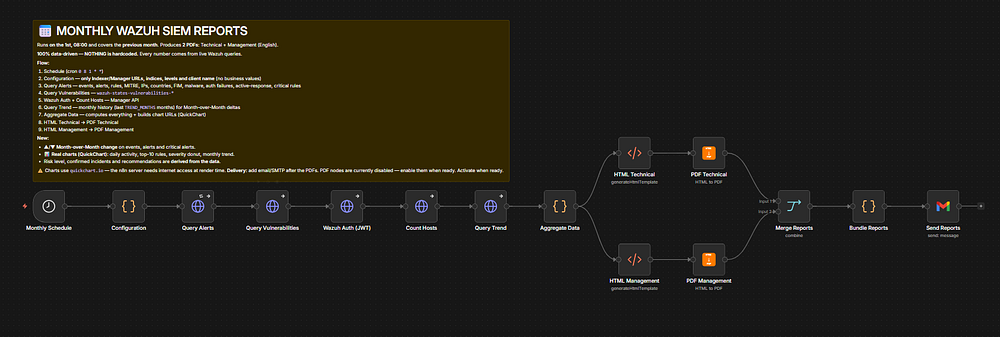
The system I’m describing is a single n8n workflow that runs on a cron schedule 0 8 1 * *, meaning 08:00 on the 1st of every month, covering the previous calendar month.
When it fires, it does this in one pass:
Queries your Wazuh Indexer (OpenSearch) for the last month of alerts, vulnerabilities, and a six-month trend.
Authenticates to the Wazuh Manager API, grabs a JWT, and counts your monitored hosts.
Aggregates everything in code computing month-over-month deltas, severity breakdowns, top rules, and MITRE techniques.
Renders two separate PDFs: a deep technical report and a clean executive summary.
Emails both as attachments to whoever you specify.
The non-negotiable design rule: every figure in the report is pulled live from Wazuh. Nothing is faked, nothing is hardcoded. If the report says 1,284 critical alerts, that number came straight from your indexer this morning.
That single constraint is what makes the output trustworthy enough to hand to a paying client or an auditor.
Two Reports From One Run — Here’s What Each Contains
This is the part that makes the workflow genuinely useful instead of just clever. One execution produces two documents tuned for two different readers.
The technical report is for your engineers and analysts. It includes:
An executive summary with month-over-month deltas on events, alerts, and critical alerts
A daily-activity chart showing exactly when things spiked
Top 10 triggered rules, with a bar chart
MITRE ATT&CK techniques rendered as
ID – Name(soT1110 – Brute Force, not a cryptic code)A severity donut, critical vulnerabilities, and File Integrity Monitoring (FIM) activity
External attack attempts, confirmed incidents, and data-driven recommendations
The management report is for the people who sign the checks. It strips the noise and delivers:
A high-level overview with the same MoM deltas
A derived risk level — computed from the data, not guessed
Key threats, SOC efficiency KPIs, and a six-month trend chart
Short / Medium / Long-term recommendations, including MITRE-driven tactical advice
Think about it this way: the technical report answers “what happened and what do we fix?” The management report answers “are we safer than last month, and what should we invest in?” Same data, two stories.
How the Charts Actually Get Into a PDF
A question I get immediately: how do you render real charts inside an automated PDF without a browser farm?
The workflow uses QuickChart, a chart-rendering service that turns a URL into a chart image. During the aggregation step, the workflow builds chart URLs from the live data (the severity donut, daily activity, top rules, and monthly trend), and those URLs get embedded in the report’s HTML.
Then the HTML gets converted to PDF by a community node called n8n-nodes-htmlcsstopdf (PDFMunk), which has a free tier that's plenty for monthly runs.
So the data flow for visuals is clean: live Wazuh numbers → computed chart config → QuickChart URL → embedded image → rendered PDF. No headless Chrome to babysit, no Puppeteer crashing at 3 a.m.
The only requirement is that your n8n server can reach the internet for the chart rendering. If you’re in an air-gapped environment, you can self-host QuickChart and swap the base URL, the workflow is built to allow that.
The Single-Config Principle: One Node Controls Everything
Here’s where most “automation” projects go wrong. They scatter settings across fifteen nodes, so customizing anything means hunting through the whole workflow and praying you didn’t miss a hardcoded value.
This workflow has exactly one place you edit: a Configuration node at the top. Everything downstream reads from it.
const config = {
  WAZUH_INDEXER_URL: "https://your_Manager_API:9200",
  WAZUH_MANAGER_URL: "https://your_Manager_API:55000",
  ALERTS_INDEX:      "wazuh-alerts-*",
  VULN_INDEX:        "wazuh-states-vulnerabilities-*",
  CORR_LEVEL: 4,    // rule.level >= this counts as "correlated"
  GEN_LEVEL:  8,    // rule.level >= this counts as a "generated alert"
  CRIT_LEVEL: 10,   // rule.level >= this counts as "critical"
  TREND_MONTHS: 6,  // months of history for the trend chart + deltas
  CLIENT_NAME: "Neetrox",                    // appears on the reports
  REPORT_RECIPIENT: "client@example.com", // who receives the email
  REPORT_SENDER_NAME: "Neetrox Security Operations"
};
Want to run reports for a different client? Change CLIENT_NAME and REPORT_RECIPIENT. Run a stricter critical-alert threshold? Tune CRIT_LEVEL. That's the entire customization surface.
For a managed security provider, this is the unlock: clone the workflow per client, change four values, done. You’re now selling automated monthly SIEM reporting as a service with near-zero marginal effort.
Setting It Up in 5 Steps
Let me walk you through the actual setup so you can see how little friction there is.
1. Install the PDF community node. In n8n, go to Settings → Community Nodes → Install and enter n8n-nodes-htmlcsstopdf. Self-hosted n8n needs N8N_COMMUNITY_PACKAGES_ENABLED=true (it's on by default).
2. Import the workflow. Workflows → Import from File → select the JSON. It opens with 15 nodes, intentionally inactive until you finish.
3. Add four credentials:
Wazuh Indexer (HTTP Basic Auth) — for querying alerts, vulnerabilities, and trend
Wazuh Manager (HTTP Basic Auth) — the workflow exchanges this for a JWT automatically
PDFMunk (HTML/CSS to PDF API key) — free tier works
Gmail (OAuth2) — for delivery, or swap it for Slack/Outlook/SMTP
4. Edit the Configuration node with your URLs, levels, client name, and recipient.
5. Execute once to test, then activate. Run it manually, confirm each node returns data and the PDF nodes output real binaries, check your inbox for two attachments then flip the workflow to Active.
That’s it. From the second month onward, the ▲/▼ delta arrows populate automatically because the workflow now has prior-month data to compare against.
Here is a Demo
The Customization That Can Makes It Resellable
Here’s where most people stop reading tutorials and start building a business.
The reports ship with a default look, but the workflow includes drop-in themes, a dark theme and a minimal print theme plus an HTML email body that looks far better than plain text. Swapping a theme is a copy-paste into the HTML node.
Branding lives in the HTML nodes and the CLIENT_NAME config value, so white-labeling a report for a client takes under a minute. And because both PDFs land on a single n8n item as binary properties (technical and management), changing delivery is trivial: delete the Gmail node, connect the bundle to Slack, Outlook, SMTP, or Google Drive instead.
So what does this mean for you? You’re not just automating your own reports. You’re building a product. Rebrand the output, point it at a client’s Wazuh stack, and resell monthly security reporting as a recurring service.
Get the Workflow
The Monthly Wazuh SIEM Reports + Guide + Bonus is available now as a ready-to-import n8n JSON with a step-by-step setup guide, and the bonus themes (dark, minimal, and the HTML email body) so you can be sending automated reports the same afternoon.
👉 Get it from — Here
👉 Pay with Paypal — Here
Common Pitfalls (and the Fast Fixes)
Automation is only as good as your ability to debug it when something drifts. Here are the issues you’re most likely to hit and how to clear them fast.
PDF node returns a tiny JSON instead of a PDF. Your PDFMunk key is invalid or over quota. Open the node’s Binary tab to read the error, then renew the key.
“Invalid token” on the host count. Your Manager Basic Auth is wrong, or the Manager URL/port is unreachable.
Charts are blank. The n8n server can’t reach
quickchart.io. Allow outbound traffic, or self-host QuickChart and change the base URL.Critical alerts always show 0. Your environment may have few level-≥12 events. Lower
CRIT_LEVELin the config.TLS errors on self-signed Wazuh certs. The HTTP nodes already set “Ignore SSL Issues” keep it on.
None of these are mysterious. Because the data is live and the config is centralized, every failure points to a specific, fixable cause.
Why “Data-Driven” Is the Whole Point
Let me close the loop on the design philosophy, because it’s what separates this from a thousand reporting templates.
A template with hardcoded numbers is a lie waiting to happen. The first time someone notices the “incidents this month” figure never changes, the entire report loses credibility and so does the person who sent it.
This workflow derives everything: the risk level is computed from severity distribution, the recommendations are generated from what the data actually shows (including MITRE-mapped advice), and the deltas come from real month-over-month comparison. There are no fabricated metrics anywhere in the pipeline.
That’s not a nice-to-have. For anyone reporting to clients, auditors, or a board, it’s the difference between a report you can stand behind and one you have to apologize for.
Stop Building Reports by Hand
Your Wazuh monthly report should not cost you half a day and a knot in your stomach every first of the month. It should arrive in your inbox technical and management versions, both as polished PDFs, every figure pulled live while you’re still drinking your coffee.
The architecture is straightforward: schedule, query, aggregate, render, send. The setup is five steps. The customization is one node. And the output is good enough to put your name on or resell to clients.
If you run Wazuh and you’re still assembling reports by hand, the next move is obvious. Set up the workflow once, run it for a month, and watch the deltas populate on the second run. You’ll never go back to screenshots.
Running Wazuh in production? Tell me in the comments how you currently handle monthly reporting — I’m curious how much time the manual version is really costing teams.