Automatically Detect New Cyber Threats Before Your Team Reads the News
2026-05-18 · Neetrox
Every day, over 500 cybersecurity articles get published across RSS feeds, vulnerability databases, government advisories, and research blogs.
No analyst has time to read them all. Not even close.
So your team does what every team does — they skim 3 or 4 sources, hope nothing slips through, and find out about the critical CVE after it hits production.
I got tired of that cycle. So I built an AI agent that reads everything, filters the noise, and only sends my team the threats that actually matter — matched against our exact infrastructure.
No API costs. No cloud subscriptions. Runs entirely on my own hardware.
Here’s how it works, and why it changed how my SOC operates.
The Problem Nobody Talks About
Threat intelligence is supposed to keep you ahead of attackers. In practice, it’s a firehose.
Between The Hacker News, BleepingComputer, CISA advisories, CVE databases, CERT bulletins, and vendor security blogs — the volume is insane. And most of it doesn’t apply to your stack.
But buried in that flood, there’s always one article that matters. One CVE that hits your exact setup. One zero-day targeting the service you’re running in production right now.
The question isn’t whether you’ll miss it. The question is when.
I needed something that would:
Monitor multiple sources continuously (not just one RSS feed)
Filter out the noise and duplicates
Detect which threats actually affect my infrastructure
Generate a clean, actionable briefing
Deliver it to my team automatically — Discord, Telegram, Slack, Email
And I needed it running 24/7 without human intervention.
The Solution: An AI Threat Intelligence Pipeline
I built a fully automated pipeline using n8n (open-source workflow automation) and Ollama (local AI inference). No OpenAI bills. No data leaving my network.
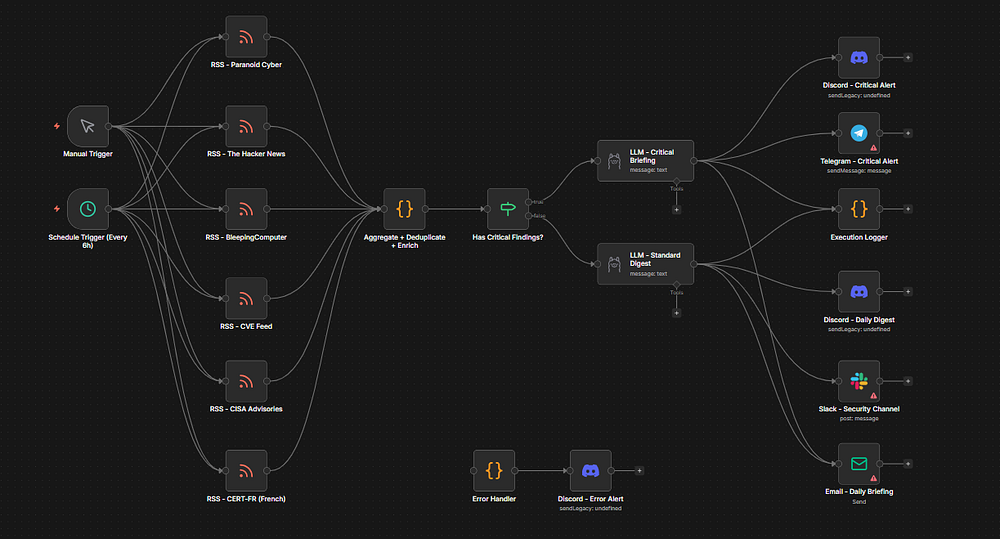
Here’s the architecture:
Stage 1 — Ingestion
Six RSS feeds run in parallel, pulling from the sources that matter:
The Hacker News — daily threat coverage
BleepingComputer — malware and vulnerability reporting
CISA Advisories — US government security bulletins
CVE Feed — raw CVE database updates
CERT-FR — French CERT advisories (I work across French and English environments)
Paranoid Cybersecurity — curated vulnerability summaries
These feeds are checked every 6 hours. Every article from the last 24 hours gets pulled in.
Stage 2 — Processing
This is where the magic happens. A custom JavaScript engine:
Deduplicates — The same Log4j story appears on 4 different feeds? It shows up once. Titles are normalized and checked against a Set.
Extracts CVEs — Every article is scanned with regex for CVE IDs in the standard CVE-YYYY-NNNNN format. Found CVEs are deduplicated and listed.
Scores Severity — A keyword-based heuristic classifies each article:
🔴 CRITICAL — zero-day, actively exploited, RCE, auth bypass
🟠 HIGH — privilege escalation, significant CVEs
🟡 MEDIUM — DoS, moderate risk
🔵 INFO — general awareness
Matches Infrastructure — And here’s the part that makes this actually useful. Every article is checked against a custom keyword list representing MY stack:
ubuntu, nginx, docker, postgresql, wazuh, thehive,
n8n, ollama, openssh, openssl, kernel, systemd...
If a threat matches anything in my environment, it gets flagged as ⚠️ IMPACTS US and floats to the top of the briefing.
This is the difference between “here’s today’s security news” and “here’s what you need to patch right now.”
Stage 3 — Severity Routing
An If node checks the processed data. If any CRITICAL findings were detected:
→ Urgent path: Detailed briefing + Discord alert + Telegram push notification + HTML Email
If no critical findings:
→ Standard path: Daily digest + Discord + Slack + Email
This means my phone buzzes only when something truly critical drops. Everything else lands in the digest channel for regular review.
Stage 4 — AI Analysis
Here’s where Ollama earns its keep. Two separate LLM prompts, tuned for different contexts:
Critical Briefing Prompt — Produces a tight, executive-style threat brief with infrastructure alerts first, CVE details, severity classifications, and one-line mitigations. Under 1900 characters for Discord compatibility.
Standard Digest Prompt — A calmer daily summary: top stories, CVE watch list, and stats. Same character limit.
Both prompts include my full infrastructure profile so the AI knows exactly what stack it’s analyzing against.
I’m running ministral:8b on 16GB of RAM. The whole inference takes about 10–15 seconds. For a briefing that would take a human analyst 30+ minutes to compile manually — that's a good trade.
Stage 5 — Delivery
The briefing lands on:
Discord — webhook to #security-alerts (most of the team lives here)
Telegram — critical alerts only (instant mobile push)
Slack — daily digest to the security channel
Email — styled HTML briefing for stakeholders who prefer email
Plus an error handler that catches pipeline failures and alerts on Discord, and an execution logger for audit trails.
What This Looks Like in Practice
Monday morning. 10:14 AM. My Discord pings:
**🛡️ EXECUTIVE SUMMARY**
Two **CRITICAL** n8n RCE flaws (CVE-2025-68613, CVE-2026-27493) are actively exploited; **CISA-listed** and impacting our automation stack. Immediate patching required.

---
**⚠️ INFRASTRUCTURE ALERTS**
- **n8n (Automation)**: **CRITICAL** RCE (CVE-2025-68613, CVSS 9.9) and sandbox escape (CVE-2026-27493, CVSS 9.5) confirmed exploited. **All instances vulnerable** until patched.
- **PostgreSQL/MySQL**: No direct CVEs, but **n8n’s RCE could compromise DBs** via workflows. Monitor for lateral movement.

---
**📋 TOP THREATS**
1. **CVE-2025-68613** (n8n) | **CRITICAL** | **RCE via expression injection** → **Immediately upgrade n8n** (no workaround).
2. **CVE-2026-27493** (n8n) | **CRITICAL** | **Unauthenticated RCE** → **Isolate n8n containers**; disable public exposure.
3. **CVE-2026-27577** (n8n) | **CRITICAL** | **Sandbox escape → RCE** → **Reconfigure n8n workflows** to restrict `eval()` calls.
4. **PostgreSQL/MySQL** | **HIGH** | **Credential exposure risk** → **Audit n8n DB connections**; rotate credentials.
5. **Docker** | **MEDIUM** | **Container escape via n8n RCE** → **Enforce `--read-only` + `no-new-privileges`**.

---
**📊 STATS**
- **Total articles scanned**: 50 | **Unique**: 7 | **CVEs found**: 5 | **Impacting us**: **2 (n8n CVEs)**
- **Actionable CVEs**: **3** (all **CRITICAL**).

---
**🔴 URGENT ACTION REQUIRED**
- **Patch n8n** (check [n8n’s advisory](https://n8n.io)) **within 24h**.
- **Disable n8n public endpoints** until patched.
- **Rotate DB credentials** linked to n8n workflows.
- **Enable Wazuh alerts** for `n8n*` process anomalies.

🕐 **2026-03-12T10:14:00.300Z**
L1 analyst reads that in 30 seconds and knows exactly what to do. No scrolling. No guessing. No missed CVEs.
Before this, the same process meant opening 4 browser tabs, reading for 20 minutes, cross-referencing against our infrastructure manually, and writing a summary in Slack. Multiplied by every morning, every analyst.
What I’d Do Differently (Lessons Learned)
Start with fewer feeds. I started with 3 RSS sources and added more after I validated the deduplication logic. Adding 10 feeds on day one just means more noise to debug.
The stack keywords matter more than anything. This is the single customization that makes or breaks the tool. Spend 10 minutes getting your keyword list right.
Ministral 8B is good enough. I tested Llama 3 8B and Mistral 8x7B. Ministral 8B produces clean, concise briefings with the lowest latency. For this use case, bigger isn’t better.
Telegram for critical alerts is non-negotiable. Discord is great for daily flow, but when a zero-day drops at 2 AM, a Telegram push notification on your phone is what actually wakes you up.
Who This Is For
This pipeline is relevant to anyone who runs infrastructure and needs to stay on top of threats:
SOC teams running SIEM/SOAR stacks (Wazuh, TheHive, IRIS)
MSPs managing security for multiple clients
Self-hosters running Docker, Nginx, databases on their own hardware
Security researchers who want automated CVE tracking
If you’re curious about the implementation details, I packaged the full workflow, the implementation guide, a library of 30+ curated RSS feeds, and pre-built stack keyword profiles into a product on my Gumroad store.
→ Security News Aggregator Pro Edition
The Bottom Line
Threat intelligence shouldn’t require a full-time analyst scrolling feeds all morning.
Build a system that reads everything, filters the noise, flags what matters to your stack, and delivers it before your first coffee.
That’s what this does. And it runs on hardware you already own.
If this helped you think differently about SOC automation, consider following me for more cybersecurity engineering content. I write about building security infrastructure that actually scales.