I Built a Phishing Email Analyzer in n8n. The AI Does Not Decide the Verdict
2026-09-12 · Neetrox
“Hey, does this look like phishing to anyone?”
Then one of two things happens. Someone senior burns 20 minutes reading email headers. Or nobody answers, and somebody clicks.
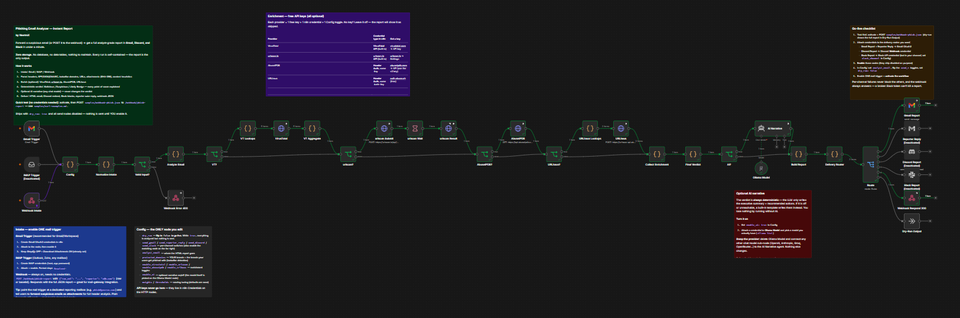
I built a phishing email analyzer in n8n to end that. A user forwards the email to one mailbox. Under a minute later, a full report lands in Gmail, Discord, and Slack. Verdict, score, and every piece of evidence behind it.
The Score Is Math, Not a Language Model
Most phishing tools built this year paste the email into a language model and ask “is this phishing?”
That fails an audit. Ask the same model twice and you can get two answers. You cannot show a client why the score is 62.
This workflow scores the email with a fixed rule engine. Every point maps to a written reason.
Sender domain is a lookalike of paypal.com: +25
The bands are yours to set. Default is malicious at 60 or above, suspicious at 25 or above. Same email in, same verdict out. Every time.
The AI is still there. It writes the executive summary and the recommended actions in plain language. That is all it does. It can never move the score. If your model is down or misconfigured, a template writes those sections instead and the report ships anyway with the same verdict.
You run it on a local Ollama, or swap in OpenAI, Anthropic, Groq, or OpenRouter by dragging one node. With a local model, no email content leaves your network.
What It Actually Checks
Six checks run on every submission.
Authentication. SPF, DKIM, DMARC, and the origin IP from the Received chain.
Impersonation. Lookalike and homoglyph domains, like paypa1.com and rnicrosoft.com, checked against brands you control. Plus display name spoofing and Reply-To redirects to free webmail.
URLs. Shorteners, raw IP links, anchor text that does not match the destination, punycode, redirects, data URIs. Nothing is ever clicked.
Attachments. Risky and double extensions, macro documents, archives, and a SHA-256 hash of every file.
Content. Urgency pressure, credential harvesting language, payment fraud language, QR phishing patterns.
Threat intelligence. Optional. VirusTotal, urlscan.io, AbuseIPDB, URLhaus. All free tiers.
The highest value setting is protected_domains. Put your own domain in it, plus the brands your staff actually get phished with.
It Works in Five Minutes With Zero API Keys
This is the part people do not expect.
Import the workflow. Activate it. POST the included sample file to the webhook. You get back a full report with a verdict of malicious and a score of 100 out of 100.
No credentials. No accounts. No keys.
The rule engine needs nothing external. With all four threat intel providers switched off, the workflow makes zero outbound calls and still produces a complete scored verdict from the message itself.
Enrichment, AI, and the delivery channels are upgrades you add later, one at a time. Anything you do not configure gets marked as skipped in the report. It never breaks a run.
It also ships in dry run mode with every send node disabled. Nothing is emailed or posted until you flip one switch.
Your Users Will Forward It Wrong
You will tell everyone to forward suspicious emails as an attachment. Some of them will. Most will hit forward like normal humans.
A plain forward destroys the original headers. Most tools either reject it or quietly produce a garbage answer.
This one runs in degraded mode instead. URLs, attachments, and content are still analyzed in full. The original sender is recovered from the forwarded header block when it is there. The report says clearly at the top that headers were unavailable and confidence is lower.
You get an honest partial answer instead of a confident wrong one.
One Report, Five Places
The same analysis goes out to whichever channels you turn on.
Gmail. An HTML report with a verdict banner, KPI tiles, a score meter, the evidence table sorted heaviest first, threat intel status, and the IOC list.
Discord. A color coded embed.
Slack. A Block Kit message.
The person who reported it. A three sentence answer. Malicious, do not click, delete it.
The webhook caller. The full JSON report.
That last one matters. It turns the workflow into a drop-in analysis API. Your mail gateway or SOAR can POST a raw email and get a scored verdict back.
The HTML report uses tables with inline styles only. No external CSS, images, fonts, or JavaScript. It renders in Gmail, Outlook, and Apple Mail with no “display images” prompt. A worst case report is around 29KB, well under the 102KB where Gmail clips messages.
If one channel’s token is bad, the others still deliver.
Nothing Is Stored
No database. No n8n data tables. No case backlog to groom.
Every run is self contained. No email content is written to disk. Nothing to back up, migrate, or leak. API keys live in n8n credentials, never in the workflow JSON, so you can export and share the file safely.
The trade is real. No case history, no dedup, no metrics over time. If you need those, this is not the right product. This one answers one question fast and forgets it.
What You Get
The complete n8n workflow, 40 nodes, documented in the canvas. A setup guide with a five minute quickstart and a walkthrough for each free API key. A sample pack with five test emails, ready made webhook payloads, and curl examples.
Requirements are light. Any recent n8n, self hosted or cloud. Everything else is optional.
Get the Phishing Email Analyzer →
Import it, POST the sample, and read the report. If it does not convince you in five minutes, nothing I write here will.