AI SOC Analyst L1 — Wazuh + OpenCTI
automation · $29.00
Stop paying a trained analyst to paste IP addresses into VirusTotal
Level 12 fires. Someone opens the alert, copies the source IP, checks VirusTotal, checks AbuseIPDB, searches OpenCTI, digs through the Indexer for what else that host did, then writes three paragraphs into Slack.
Eleven minutes. Forty times a day.
Your analyst isn't analysing. They're doing data entry with a security clearance.
What you get
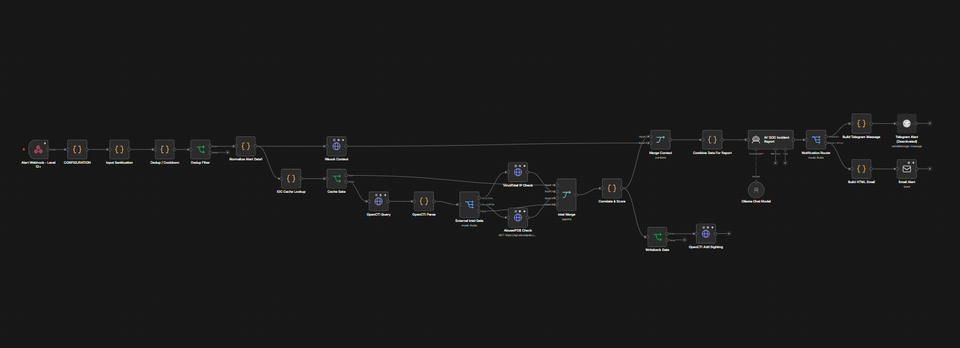
An n8n workflow that sits behind your Wazuh manager and turns every level-12+ alert into a written incident report in Telegram and email, seconds after the alert fires.
Not a JSON dump with a VirusTotal score glued to it. A report: verdict, combined score out of 100, which sources were queried, which were skipped and why, related events from your Indexer, and a deep link straight into the OpenCTI record.
Your intelligence leads
Most enrichment templates treat VirusTotal as the oracle. This one treats your OpenCTI as the primary source, weighted 50 of 100 points, against 30 for VirusTotal and 20 for AbuseIPDB. The intel your team curated outranks the public feed.
Three rules the workflow will not break:
One source is never a conclusion. A single flagging source caps the verdict at SUSPICIOUS and stamps it requires analyst confirmation. No AI declaring CRITICAL off one VirusTotal hit.
"Not queried" is never reported as "clean." Every report carries sources used, sources skipped, and a plain-English decision trail.
Nothing is blocked. Nothing is closed. This build contains no auto-response code to accidentally enable. Every verdict ends with a human.
A nine-row decision table governs when the quota-limited APIs are worth calling at all — so a free VirusTotal key (4 lookups a minute) survives real alert volume instead of dying at 09:15.
The narrative is written by your own Ollama. Alert bodies, hostnames and internal IPs never leave your network.
Report Example
Video Demo
Live in under an hour
Import the JSON. Attach seven credentials. Fill in one config node. Fire a test alert with the included script. Turn it on.
The setup guide assumes nothing, including the traps that eat a whole day: why the Telegram chat ID isn't the bot, why AbuseIPDB's auth header is literally Key, and why n8n refuses your OpenCTI credential until the hostname sits in Allowed Domains.
Not for you if
You don't run OpenCTI 5.12 or newer, you want automatic IP blocking, or you want a black box that just says "bad."
Safe the moment it lands
Both delivery nodes ship disabled. Write-back ships off. Import it, run it dry, read the reports it would have sent then enable it.
Need help?
Want to customize or deploy it for you? Get deployment & customization
Guarantee
If the workflow doesn't import cleanly or the nodes don't work as described, reach out and I'll fix it or refund it, no questions.